Communications Options for the Common Man – Part 3, by Tunnel Rabbit

(Continued from Part 2.) Low-Power Radio, Communications Planning, and SOI Several radio types that are relatively easy to use can used to complete a commo plan. To start, choose a primary platform such as either FRS, GMRS, MURS, or CB, and then choose an alternative to standardize on. Then select a primary and alternative channel for both your primary and alternative radio services.  Expect to be jammed and be prepared with a set of Signals Operation Instructions (SOI) so that all understand when and how to quietly switch to the alternative channel or radio service. For longer ranges, GMRS and …


Communications Options for the Common Man – Part 2, by Tunnel Rabbit

(Continued from Part 1.) I’ve busted other Ham buddies who were not FCC compliant with an embarrassing phone call.  It is a fun and a useful exercise and practice of a poor man’s version of what is referred to by the military as Signals Intelligence (SIGINT). Intelligence of any kind, from Human Intelligence (HUMINT) to SIGINT is needed, because intelligence gathering in general is essential to our security operation. Intelligence from all sources should drive our security operations.  I (and others) will be listening for radio traffic as that is the easiest form of intelligence available to the survivalist.  As …


Communications Options for the Common Man – Part 1, by Tunnel Rabbit

We live in uncertain times where tens of millions of foreign invaders comprised largely of military-aged males have recently and in organized fashion crossed our borders. They were assisted by U.S. government-funded NGOs south of the border. We certainly should wonder about their intent. And there are many other significant threats that we should be concerned with particularly as the world is rapidly becoming unstable, both economically and geopolitically. At some point in the near future, World War 3 will break out and the economy at home will suffer greatly, causing riots in the streets that would further destabilize this …


Old School Commo: EE-8 Field Phones, by Tunnel Rabbit

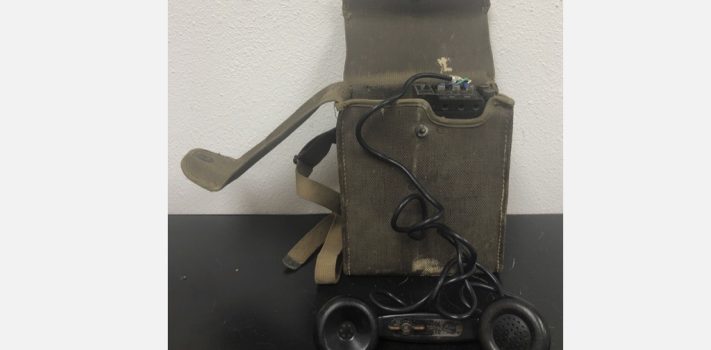
Because I know how easy it is to use a USB SDR Dongle (a poor man’s spectrum analyzer) to find radio transmissions, and how drones might be used to DF signals, I’d rather use hard wire field phones whenever possible, and certainly on those occasions when, or if a drone might be in my remote area. Using low-powered transceivers and directional antennas can be effective in most situations.  But in extreme situations, I would use a field phone if at all possible, and to conduct daily communications with LP/OPs, and with neighbors. Field phones are part of my commo plan …


A Simplified Disaster Network – Part 2 by J.M.

(Continued from Part 1. This concludes the article.) Synchronizing The second useful capability I wanted this solution to support is the ability for various applications I use to synchronize their data with a single ‘master’ copy. That allows multiple individuals to read, edit and update information and ensure everyone has easy access to the latest version. For example, in my article on setting up a laptop for use after a disaster I mentioned the use of tools like Obsidian and/or Joplin for managing things like intelligence information, basic note-taking, inventory management, etc. Both of these applications support the ability to …


A Simplified Disaster Network – Part 1, by J.M.

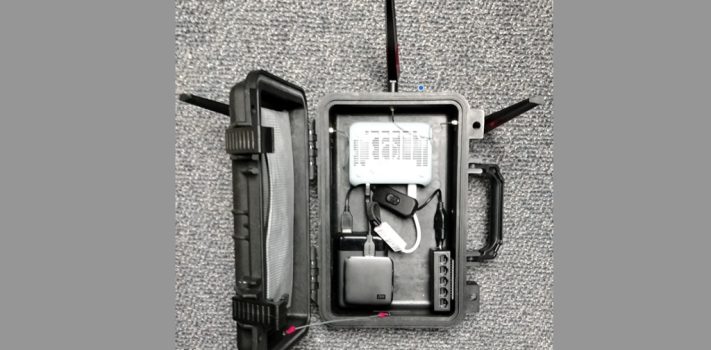
Having an operational computer network running in a post-SHTF world may seem frivolous to some people. But if you have any plans to use computers, tablets, or cell phones as part of your post-disaster operations, it can provide the capability for those devices to communicate, share data and synchronize their activities. It can also provide some support for important things like WiFi security cameras and WiFi sensor monitoring. In a previous article (parts 2, 3, 4, 5) on SurvivalBlog I discussed how to set up a mobile WiFi/Ethernet network running a local cloud server (NextCloud) in a box for use …


A Disaster Laptop Computer – Part 3, by J.M.

(Continued from Part 2. This concludes the article.) Reference Material Another useful function that computers do really well is store, manage, and interact with information. No one can remember everything, and there are a lot of sources of free or low-cost eBooks, articles, documents, manuals, etc. on the Internet that can be extremely useful for a post-disaster world. I created a folder on the 1TB microSD card on my disaster laptop named ‘Reference Material’, and here are some of the things I’ve collected and stored there: SurvivalBlog Archive – ($33) An obvious choice for SurvivalBlog readers. [JWR Adds: It also …


A Disaster Laptop Computer – Part 2, by J.M.

(Continued from Part 1.) I’ve created a list of the applications that I consider critical for supporting my post-disaster requirements. Where possible I prefer free or low-cost and open source software, but there are a couple of applications that you’re better off paying for. Note that many free or open source projects have the option to donate to their efforts – those folks invest a lot of their personal time writing and maintaining the applications, so if you find it useful please consider making a donation to help support their efforts. While I’m focusing on a Windows solution, most of …


A Disaster Laptop Computer – Part 1, by J.M.

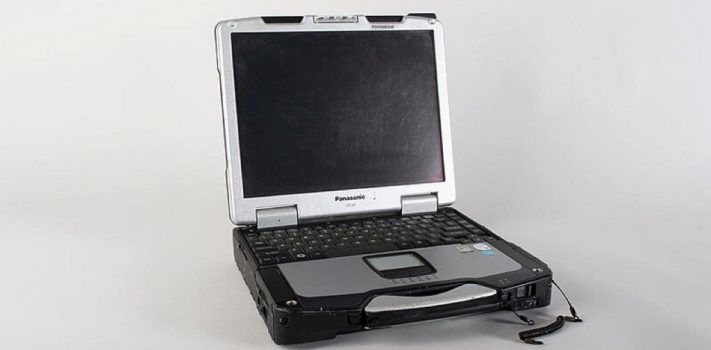
Unless you’re already living completely self-sufficiently and off-grid, when a TEOTWAWKI scenario comes along you’re going to have to quickly adapt your lifestyle and mindset in order to survive long-term. That means bringing all of your preparations to bear, including skills, expertise, information and supplies. While you may have prepared for immediate survival, implementing a major long-term shift in your lifestyle will require an organized approach to keep track of the information, schedules and other activities you’ll need to keep going. In ‘normal’ times many of us use computers to perform these types of activities, and there’s no reason you …


OffGrid Faraday Bags, by Thomas Christianson

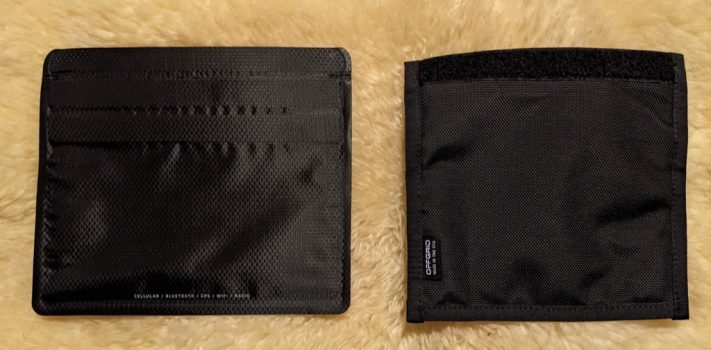
Faraday bags offer both privacy and protection. They protect sensitive electronic equipment from damage that might arise from EMP or Carrington-like events. They also provide privacy for equipment that can be traced or surveilled electronically. The bags block electromagnetic signals, rendering the equipment untraceable and unreadable as long as it remains encased in the bags. OffGrid Faraday Bags is a cybersecurity company that makes Faraday bags for a wide range of electronic equipment including mobile phones, tablets, notebook computers, key fobs, passports with RFID chips, and similar items. Their bags are designed for the military, law enforcement, intelligence, and personal …


Lessons From Hurricane Helene – Part 1, by A.F.

The following recounts some Hurricane Helene lessons learned from Western South Carolina. Our power went off for the final time around 5:30 on Friday morning. It had blinked on and off twice earlier in the night, but I didn’t pay the warnings any attention. In the end, we were without power for nine days and only tonight as I’m writing this, 26 days post-storm did we get our regular Internet service back. I am fully aware that these are First World problems and compared to so many, Helene took it easy on us. Beyond ensuring that our vehicles were fueled, …


Lessons Learned from Hurricane Helene, by N.C. Ham

I really did not give a lot of thought ahead of time about the approaching storm. I spent time at U.S. Naval Station Guantanamo in Cuba growing up and I have lived through several hurricanes in the Southeast. I won’t make that mistake again. I now see how we can get way too comfortable with the daily situation live in and not see the forest for the trees. My work location is several hours from my home which is in the mountains of Western North Carolina. I work from home about half the time and was in the mountains when …


The Final Countdown: Last-Minute Readiness Checks – Part 1, by Michael X.

Hypothetically, (of course), assume for a moment that the proverbial fan has been hit. Now you have three days….or two weeks….or two months…until the consequences of the event hit where you are. Good luck guessing how long it takes to hit you. Are you as ready as you can be? Are you sure? How do you know? How and when it hits you, whatever it may be, may be based on three key things: the type/cause of disaster, your proximity to the disaster or populated areas, and the stability of your systems (electricity, water, fuel, and human support systems). THE …


Prepper Group Training: Indigenous Guerrilla Teams – Part 2, by Bulldog

(Continued from Part 1. This concludes the article.) The Challenge To understand why I feel we are lacking in our preparation of these men and women, let us look at only one necessary skill set, team radio communications. Certainly we could agree that it represents one of the key core elements critically necessary to prepper and survivalist groups. Yet, in most cases it is overlooked or minimized by group leadership. Instead, we relegate programming to the “commo guy” and hope that after stuff hits the fan (SHTF), group members will somehow magically demonstrate more interest. Please understand that I am …


Field Intelligence Collection – Part 6, by J.M.

(Continued from Part 5. This concludes the article.) Scent and Touch Smells and tactile input generally won’t provide a lot of significant intelligence by themselves, but there may be instances where they could be useful. For example, the smell of smoke can be detected from a long distance away, especially if you’re downwind from the source. If you’re patrolling and you smell smoke, make a note at the location using OsmAnd and include the current wind direction – that way if you don’t have time to check it out immediately it can be added as a ‘to be investigated’ item …