(Continued from Part 1.)
Hidden Rooms and Secret Passages
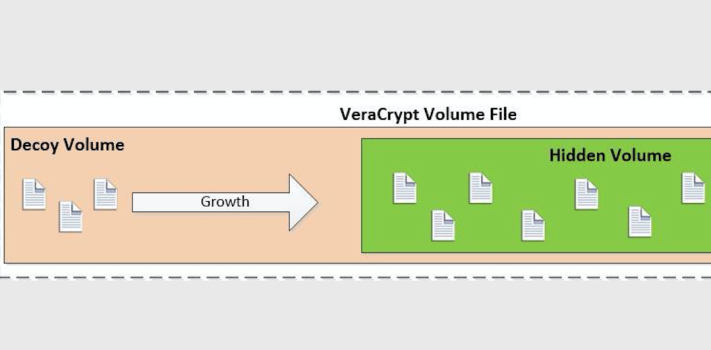
VeraCrypt has an extremely useful feature called a ‘hidden volume’, which is what we’ll be using to hide and protect sensitive files. As I mentioned earlier, a volume is basically a chunk of storage (file) that Windows mounts and assigns a drive letter to. What VeraCrypt does is allows you to create a big encrypted file and mount that as a virtual storage volume – ‘virtual’ in this case just means that the volume doesn’t correspond to a unique physical storage device, since the file can be moved anywhere and still mounted and accessed. However, VeraCrypt goes one step further and allows you to create a second hidden encrypted volume inside the first volume – which volume is mounted depends on which password you type in when you tell VeraCrypt to mount the file that contains the volumes.
In order to keep the storage space separate for the two volumes inside the file, VeraCrypt stores files in the outer decoy volume starting at the beginning and moving towards the end. The inner hidden volume is created from the end of the file and is filled in towards the front. This creates a situation that you need to understand – if you have the outer decoy volume mounted and add a lot of files after you’ve created a hidden inner volume in the same file, you could potentially overwrite the beginning of the hidden volume, which will mess up the hidden volume and prevent you from ever mounting it again. Conversely, once you’ve created the volume file and a hidden volume inside of it, you can’t expand the size of either without messing things up.Continue reading“Fade to Gray: Files and Documents – Part 2, by J.M.”